Chasing a 4WD problem

fechnerj

Member
Apr 25, 2012
33
When I start out first time in a given day, read everything is at ambient temperature, no issues are indicated. Selector lights go thru start up flash then settle on selected 2wd, all normally, no CEL light, etc. So, I drive away, engine temp comes up to normal. Park at post office, grocery store, etc. Return to truck, start and I get service 4wd light and no lights on selector switch. Somethings going on that's temperature sensitive.

I've changed the selector switch, the encoder motor and problem persists. My next idea is to get a TCCM, but before I get that ordered any ideas about something I'm missing here?
 
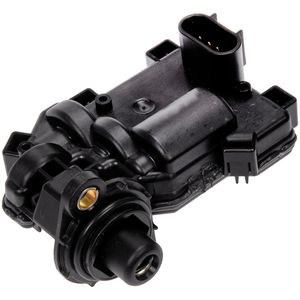
I had this problem recently. Exact same symptoms. Turned out to be the actuator for the front axle disconnect. Easy to replace.
Make sure you get the proper one for your vehicle.
 
To be certain of what is causing the error, you would need a scanner capable of reading C codes. You could be replacing parts, like you already have, and still not find the issue.

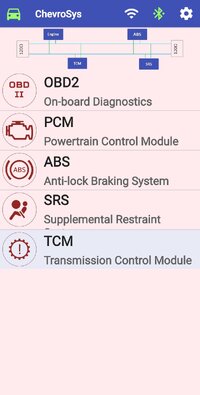
There are Android apps, like Chevrosys and Car Scanner Pro, that can read them using a Bluetooth OBD adapter. The blue Veepeak sold on Amazon is a good and inexpensive one.
 
Actually, I have a Torque app, not pro. I previously used it to look for stored codes, but as I recall this was before starting out in the morning and no active check lights were displayed.
 
I've got a Veepeak obd unit and Torque Pro app. I'll check it out.

The last time I checked,,, the Torque Pro app failed to show codes from the 4wd system even though there were codes there.

If you have the TorqueScan add-on there is a terminal mode in there. In the terminal mode I can instruct how to manually read codes yourself if you are inclined to do so.
 
Although this app is not on google play, it is on some other "mirror sites". I have used it on my 2008.
I have Chevrosys Pro version 1.3. In this version there is no support for the 4WD system.
Screenshot_20250706-142400_ChevroSys Pro.jpg


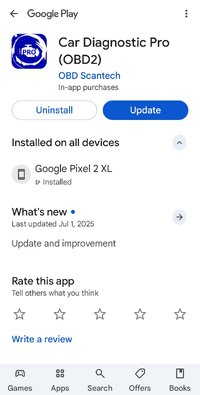
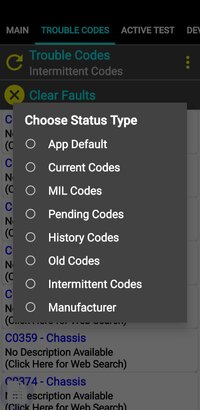
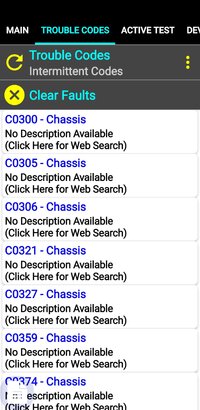
Among the many apps I have is Car Diagnostic Pro which is an updated version of the older Car Gauge Pro. That app is in the Play Store and does support the 4WD system (seen as Transfer Case). Like it's older brother it allows you to select what code status you are interested in seeing.

Screenshot_20250706-143007_Google Play Store.jpg
Screenshot_20250706-142728.jpg

Screenshot_20250706-142936.jpgScreenshot_20250706-142924.jpg
 
I'm not getting any 4wd codes using the Torque Pro scan tool, so I have just installed the Car Diagnostic app to try to retrieve codes.
I also have a Autel ML619 scan tool. It's OK for live data, but getting trouble codes are limited, it seems, to P codes.
As mentioned, the problem happens only after warming up/driving a few miles so I'm getting the OBD situation worked out so I can read transfer case codes then I'll be hopefully able to figure it out.
 
True there... Torque Pro will not display these codes.


Hit me up with questions if needed Reading these codes will require at least a foundational understanding of the way the codes work.
So, i got Car Diagnostic Pro app running. Only hitch in that is the GM program indicated up to 2007 covered. Mine is 2009. I sent message to them to confirm if 2009 will work, no answer yet. Meantime, with all of the on/off ignition cycles, the service 4wd light came on and selector has no lights on. I ran a check for any codes thrown and got nothing.
 
I got a reply from Car Diagnostics. My 2009 Envoy is not supported.

I will have a look at this myself. Here is the "thing"...

Many of these apps want to connect to the PCM or ECM to verify an OBD connection is made.

The Car Diagnostics Pro app is written for the older Class II SAE J1850VPW serial data protocol. NOT the newer ISO 15765-4 CANBUS protocol.

Being a 2009 your trucks PCM and TCM use the newer CANBUS protocol.

BUT, all the other modules, including your TCCM (transfer case) module use the older Class II SAE J1850VPW protocol.

SO..... If you try to read codes from your PCM or TCM using Car Diagnostics it will fail to make the connection.

BUT,,, If you try to read codes from your TCCM (Transfer Case) it may work just fine.

Did you try reading transfer case codes?
 
I got a reply from Car Diagnostics. My 2009 Envoy is not supported.

Well I just investigated this myself and it is as I suspected The app requires a response from the PCM.

So that app will not work for you.

The issue is that these ELM type devices can only connect with one protocol at a time. But the apps want to verify connection to the PCM. But to read TCCM codes we need to connect to the older network, not the network with the PCM on it!!

There is a way to read these codes yourself manually using a serial terminal app. That is a bit techy and may not be for everyone. I have walked users through that before.
 
  • Like
Reactions: Mooseman
Thanks for the confirmation on scan app.
I installed the Garage Pro app. They charge yearly subscription fee to get the full package. Ran a diagnostic. See screenshot. The C1017 and others seem to point to the TCCM. What do you think?
 

Attachments

  • Screenshot_20250708_110935_GaragePro.jpg
    Screenshot_20250708_110935_GaragePro.jpg
    138.6 KB · Views: 12
Thanks for the confirmation on scan app.
I installed the Garage Pro app. They charge yearly subscription fee to get the full package. Ran a diagnostic. See screenshot. The C1017 and others seem to point to the TCCM. What do you think?


I don't see any 4WD system listed for modules scanned.
 
Correction C0455 not C1017

C0455 is a code for the steering wheel position sensor. Is not part if the 4WD system.

From what we see here the Garage Pro app does not scan the Transfer Case Control Module which is on the older simgle wire class II serial data network.
 
One thing I keep wondering. When I went out first thing this am, ambient temp 65-70, installed veepeak obd2 device, turned key on, not start. I had no cel lights. I ran the app for codes and got the list shown. I ran a clear codes and then turned everything off. I came back about 3 hrs later, temp now 87. Mind you, the car wasn't started or moved this entire day. I now had a service 4wd light, no selector switch lights. I ran a scan and got only 1 fault, C0550. Sure seems issue is temperature sensitive because nothing mechanical was operated.
 
Sorry, messages crossed. There is a 4wd scan choice and it reported 4 faults of the 7 total as 4wd related. It does not report which codes are 4wd's.
 
Enclosed C0550 readout. Sure looks like a TCCM that is temp sensitive could be the deal.
 

Attachments

  • Screenshot_20250708_145146_DuckDuckGo.jpg
    Screenshot_20250708_145146_DuckDuckGo.jpg
    174.5 KB · Views: 4
It does not report which codes are 4wd's.

This is where seeing the raw messages help. The serial data messages that report codes specify exactly which module is reporting each code. No ambiguity.

C0550 can also come from the EBCM.
 

Attachments

  • Screenshot_20250708-181810_Chrome.jpg
    Screenshot_20250708-181810_Chrome.jpg
    255.4 KB · Views: 2
The U codes are also pointing to communications errors, especially from the EBCM/ABS module. It could be throwing garbage data into the network and affecting other modules, like the TCCM. I would at least disconnect the EBCM and see if it clears some things up. I do know that the EBCM and TCCM talk to each other for when 4WD is engaged, the EBCM modifies how it applies ABS braking.
 
Just for the sake of checking out the Garage Pro app I installed it this morning. I did not purchase any subscription(s) as I have no need for them.

I ran the app and connected to a 2008 PCM and a random TCCM wired up at my kitchen test location (2 drawers of a 6 drawer chest).

I can confirm that the app has the ability to reset an ELM327 type device during code reads, switching from ISO 15765-4 CANBUS to the SAE J1850VPW Class II serial data as needed.

Before reading the TCCM codes the app attempted to connect to a PCM at node $10 on the serial data bus. There was no PCM there but the app tried several methods of connecting there anyway. This is common with these apps, they try all manner of things to find a connection.

BTW, these 2008 and 2009 PCM do participate on the serial data bus in addition to the CANBUS. They appear as node $11 there and trouble codes can also be manually read from there but I have not yet compared the results returned across the 2 networks.

The app then retrieved codes from the PCM using CANBUS and then switched to Class II Serial Data to handle the TCCM.

So we know the app will indeed retrieve codes across both networks on these 2008 and 2009 GMT360/370.


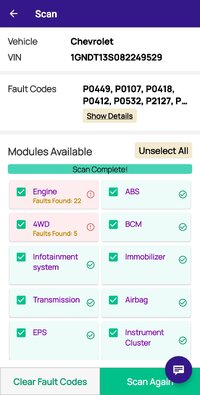
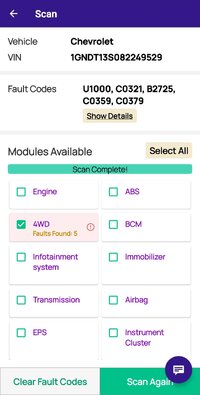
The app will present a listing of "Modules Available" but this is NOT taken from the vehicle. It is simply what the app believes MAY be present in the current vehicle, likely based on some master list the app contains.

Selecting all modules causes the app to search for a connection to modules that are not present in the vehicle. This will add a good deal of wasted time to the scan.
Screenshot_20250709-071007_GaragePro.jpg


It can be seen that the app presents 5 or 6 codes without purchase of any subscription. If one scans only the TCCM (4WD) thats all anyone really needs for the most part. The code descriptions can be looked up in Service Information(s) available free at Charm.li
Screenshot_20250709-071202_GaragePro.jpg


Edit: I want to do a followup test with regards to clearing codes. I wish to see that when clearing codes does the app clear codes ONLY for the module selected. This is highly desireable as there is no reason at all to clear your engine and emissions related codes when working on your 4WD system. When working with codes manually from a serial terminal one can clear codes from a single module such as a TCCM or EBCM and not affect any other system at all. So your emissions related systems remain ready for state/local tests as required.

 
Last edited:
  • Like
Reactions: Mooseman
The U codes are also pointing to communications errors, especially from the EBCM/ABS module. It could be throwing garbage data into the network and affecting other modules, like the TCCM. I would at least disconnect the EBCM and see if it clears some things up. I do know that the EBCM and TCCM talk to each other for when 4WD is engaged, the EBCM modifies how it applies ABS braking.
Where on truck is the EBCM located?
 
Where on truck is the EBCM located?

EBCM is on the inward side of the left frame rail beneath the drivers seat area of the truck.

There is a ground cable nearby on the outward side of the frame rail and a little forward of the EBCM. This ground point is a well known trouble spot for the EBCM.
 
  • Like
Reactions: Mooseman
OK, thanks, I'll get into it tomorrow, disconnect cable, see what happens.
I'm liking this GaragePro app, and after digging a bit deeper, I canceled the subscription upgrade because the free version seems to have the important stuff. Actually, for the normal seek and fix diy'er it's pretty good. Found it thanks to Mooseman.
 
thanks, I'll get into it tomorrow, disconnect cable, see what happens.

Pulling the BRAKE fuse in the rear fuseblock is an easier way to disable it. The ABS fuse is only power for the pump motor so that has nothing to do with the rest of the module.

And the EBCM only has power with the key in the RUN position. It is not powered any other way.
 
  • Like
Reactions: Mooseman
Pulling the BRAKE fuse in the rear fuseblock is an easier way to disable it. The ABS fuse is only power for the pump motor so that has nothing to do with the rest of the module.

And the EBCM only has power with the key in the RUN position. It is not powered any other way.
Unless it's shorting the network internally, but then, this would bring the whole network down and there would be way more modules unable to communicate.
 
  • Like
Reactions: TJBaker57
Unless it's shorting the network internally, but then, this would bring the whole network down and there would be way more modules unable to communicate.

Yes. If anything at all shorts the serial data line to ground there will be no communications at all. None. No scantools or code readers will work either.

The same will happen with a short to power instead of ground of course.

I suppose if there were an intermittent issue that shorted the serial data line just momentarily it could conceivably show in some modules before others.

It does not report which codes are 4wd's

If you scan ONLY the 4WD selection then you will see ONLY 4WD codes.
 
  • Like
Reactions: Mooseman
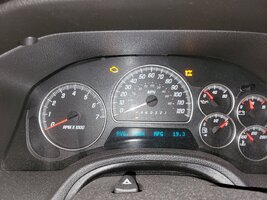
So, I pulled the brake fuse as suggested and enclosed are screenshots of the before & after dash displays. The last screenshot is the scan results with fuse pulled. I'm not seeing anything unexpected here, so my next step will be to check the ground condition at BCM. Also I ordered a TCCM on ebay. Meantime, I've pulled the TC fuse #8 to prevent unexpected shifts. Just got back from 40 mile trip to town. Truck runs great, shifts smoothly, avg fuel 20 mpg. Just need to find this 4wd gremlin.
 

Attachments

  • 20250709_203834.jpg
    20250709_203834.jpg
    787.2 KB · Views: 2
  • 20250709_203619.jpg
    20250709_203619.jpg
    400.1 KB · Views: 2
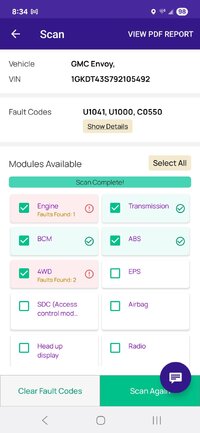
Last screenshot of scan result with brake fuse pulled.
 

Attachments

  • Screenshot_20250709_203417_GaragePro.jpg
    Screenshot_20250709_203417_GaragePro.jpg
    134.6 KB · Views: 16
I had this problem recently. Exact same symptoms. Turned out to be the actuator for the front axle disconnect. Easy to replace.
Make sure you get the proper one for your vehicle.
I'm curious about your experience. Did you replace the actuator only or the complete disconnect/actuator assembly?
 
So you weren't getting an ABS error light before? Only the Stabilitrak light? That would mean that only the Steering Wheel Position Sensor is bad, which was one of the codes. That is the only part that is specific to the Stablilitrak system only. Otherwise, when there is an ABS fault, both the ABS and Stabilitrak lights come on. Those ABS communication codes could have been historical. I would erase all codes, drive a bit and rescan.

If you scan ONLY the 4WD selection then you will see ONLY 4WD codes.
I would do this and get that code. That will tell us what is at fault before you shotgun parts at it.
 
I would do this and get that code. That will tell us what is at fault before you shotgun parts at it.

The last screenshot posted sort of gives us the view we were looking for. It shows just 2 modules reporting codes and gives the number of trouble codes found for each module.

Assuming the 1 PCM code is listed first, U1041 being the PCM losing comms with the EBCM, then the next 2 codes would be the TCCM.

There we see a U1000 and the C0550.

The U1000 tells us that at serial communications startup the TCCM expected to hear from some other module and it did not hear the expected message.

The C0550 is a test run on the internal memory of the module, checking checksums of ROM, RAM, EEPROM and such things. That DTC typically runs once at startup/wakeup.
 
The last screenshot posted sort of gives us the view we were looking for. It shows just 2 modules reporting codes and gives the number of trouble codes found for each module.

Assuming the 1 PCM code is listed first, U1041 being the PCM losing comms with the EBCM, then the next 2 codes would be the TCCM.

There we see a U1000 and the C0550.

The U1000 tells us that at serial communications startup the TCCM expected to hear from some other module and it did not hear the expected message.

The C0550 is a test run on the internal memory of the module, checking checksums of ROM, RAM, EEPROM and such things. That DTC typically runs once at startup/wakeup.
So, are you saying the fault is likely in the TCCM?
 
That last screen shot doesn't show any TCCM related codes, just the EBCM and the general U1000.

However, in the previous one, I noticed this one:

b2725 active transfer case mode switch fault

So this could be as simple as just exercising the switch back and forth a bunch of times or even taking it apart, spray some contact cleaner in it and exercise it again. At worse it may need a new switch or the wiring is at fault.
 
That last screen shot doesn't show any TCCM related codes, just the EBCM and the general U1000.

However, in the previous one, I noticed this one:

b2725 active transfer case mode switch fault

So this could be as simple as just exercising the switch back and forth a bunch of times or even taking it apart, spray some contact cleaner in it and exercise it again. At worse it may need a new switch or the wiring is at fault.
The B2725 was from Baker's bench test not my vehicle. The only fault I'm getting now is C0550.
 
If the Service 4x4 light is coming on, there should be a code. You have to scan while the truck is on and the light on.
 

Forum Statistics

Threads
24,342
Posts
649,503
Members
20,914
Latest member
BeezyBee

Members Online