Temporary misfire

Machoman

Member
Joined
Mar 10, 2014
Posts
123
Last night in the cold and rain, I had to move the Envoy so my wife could go to work. As soon as I turned it on I could hear and feel that the engine was misfiring. The check engine light wasn’t on. I decided that I would hook up my scan tool. It gave me the generic misfire code. Ok, I have a bad coil pack or maybe a bad spark plug.

This morning I start the Envoy up and it’s running perfect.

My question, was this just a random thing or is one of my coils/spark plugs failing.

Not sure if this was weather related. Rain with air temperature 40F (4.5C)
 
Mileage on plugs? The #4 coil is notorious for failing first due to the location of the notch in the sheet metal along the hood seal, allowing water to drip into that area at times.

Do you have a bluetooth OBD scanner? This in conjunction with the torque pro app will allow you to monitor real-time misfires on each cylinder.

Other than that, once the misfire is consistent enough the PCM will give you a specific cylinder #.
 
  • Like
Reactions: mrrsm
I am trying to located the misfires on the Torgue pro app. What is display would it be under?
 
I am trying to located the misfires on the Torgue pro app. What is display would it be under?

Have you used Torque Pro before? If this is a new installation you need to load the GM specific PIDs first before you will have access to the misfire data.

From the main screen click the gear Icon and select settings, then select Manage Extra Pids. Then at top right click the 3 vertical dots and select Add Predefibed set. Select Pontiac/GM/Opel
 
  • Like
Reactions: gmcman
I have only used Torque for reading codes. I added the Predefibed set. I am not sure what all this is. I attempted to find the it on the real time information. I might have to be connected to the vehicles ECU. (at work at the moment working hard.)
 
I have only used Torque for reading codes. I added the Predefibed set. I am not sure what all this is. I attempted to find the it on the real time information. I might have to be connected to the vehicles ECU. (at work at the moment working hard.)

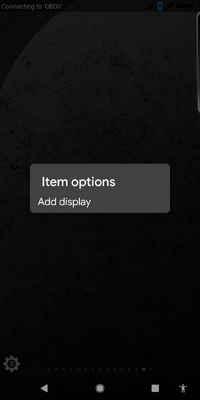
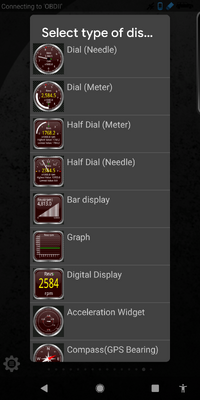
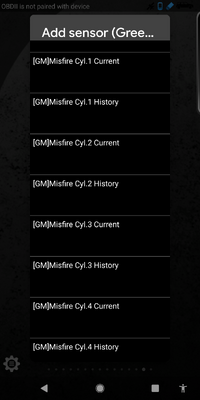
Once in realtime information you then have to add the gauge(s) to a screen. You swipe left and right to change screens. To add a gauge long-press on a blank area of screen and select add diisplay, select the type of display, then scroll down to what you want to add, in this case [GM] Misfire yada yada...

Screenshot_20200910-152023.pngScreenshot_20200910-152038.pngScreenshot_20200910-152111.png
 
  • Like
Reactions: gmcman
Aside from the Good Technical Diagnostics needed here, given the appearance of the Rain and recent inclement weather and as per @gmcman 's mention of the history with the particular failure of the Rubber Cowl Seal on the GMT360s Hoods... THIS linked Thread may speak more to the way others solved the issue:


Here are the Two TSBs for the GM Vehicles with the 4.2L and V8 Engine powered Vehicles involved with this problem. (Repair Images Included):
 

Attachments

Last edited:
Well, I got the misfire gauges to appear on the Torque Pro app, but they are working. Is there something that I am missing. The other gauges are working.
 
Well, I got the misfire gauges to appear on the Torque Pro app, but they are working. Is there something that I am missing. The other gauges are working.

Are they the 'current' gauges, or the history ones?
 
Are these active in Torque Lite as well?

I too am having random misfires, usually on humid days and when going up a hill. Typically occuring between 1900-2200 RPM, but also noticed at idle on those humid days. Every once in a while I'll get a P0300 or a pending P0300.
 

Forum Statistics

Threads
24,305
Posts
649,055
Members
20,822
Latest member
chad.mckenna

Members Online